07:03:50 25/3/2025 - 3 lượt xem
Resolving CSRF and Authentication Issues When Calling Laravel 11 API with Postman
While developing a route in Laravel 11 and testing it via Postman, I encountered two major issues:
- CSRF protection blocking the request
- Laravel authentication preventing access
In this blog post, I will walk you through how I resolved these challenges and successfully called my API.
Handling CSRF Protection
Laravel applies Cross-Site Request Forgery (CSRF) protection by default, which can prevent API requests from being executed successfully. To bypass this issue for specific routes, I modified the bootstrap/app.php file as follows:
return Application::configure(basePath: dirname(__DIR__))
    ->withMiddleware(function (Middleware $middleware) {
        $middleware->validateCsrfTokens([
            'bots/*',
        ]);
    });
In my case, I needed to call an API with a route pattern like localhost:8000/bots, so I explicitly allowed all routes under bots/* to bypass CSRF validation.
Bypassing Laravel Authentication in Postman
Laravel’s authentication system requires proper session handling, which can be a challenge when making API calls via Postman. To authenticate successfully, I needed to pass Laravel's session cookies from the browser to Postman. Here’s how I did it:
- Log into the application via a web browser
- Open Developer Tools (F12 or right-click -> Inspect)
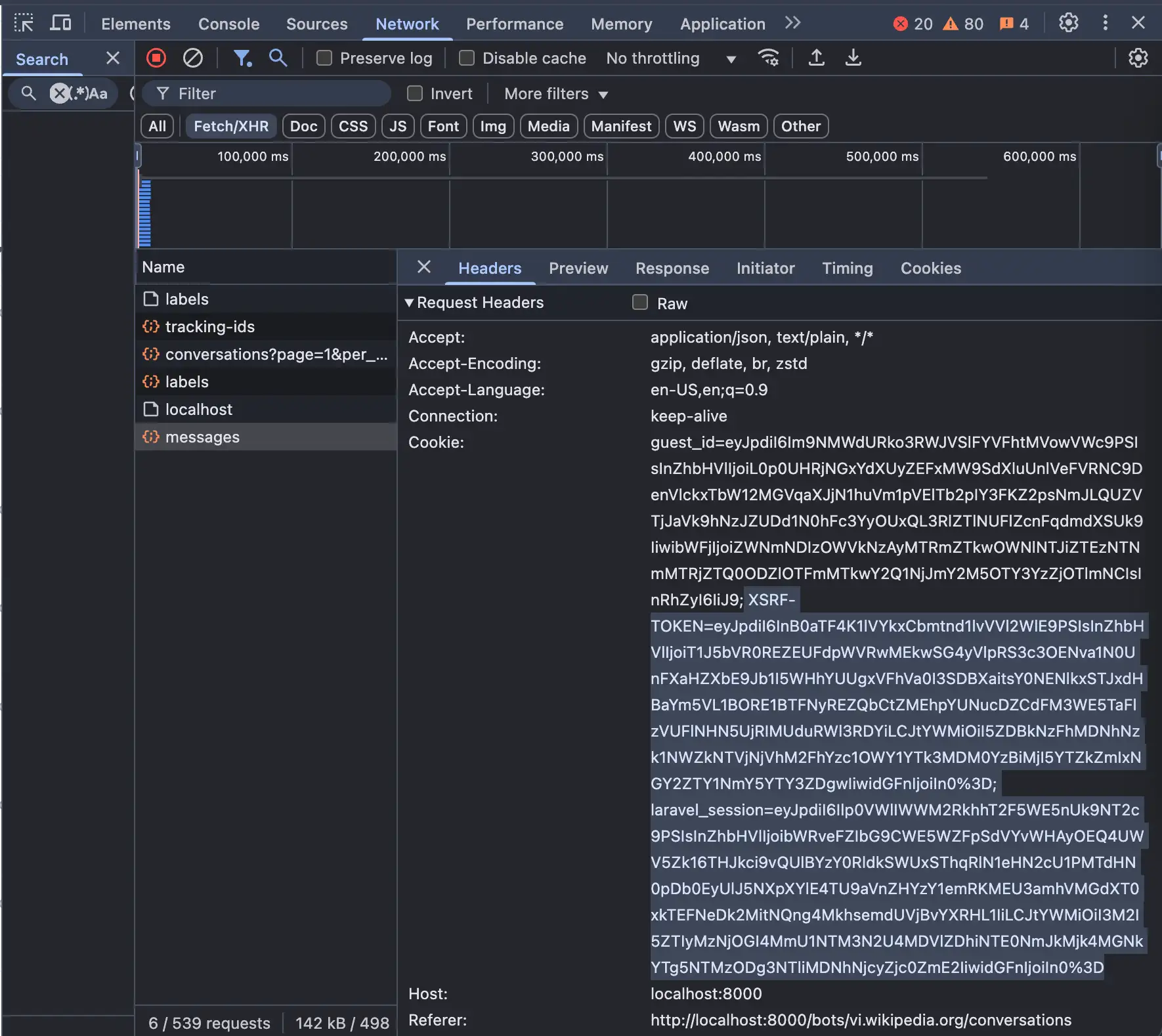
- Go to the Network tab and filter by XHR requests
- Find a request that includes authentication headers
- Copy the cookies used for authentication, which include
XSRF-TOKENandlaravel_session Figure 1 - Add these cookies manually in Postman under the Headers section: Figure 2 & Figure 3
XSRF-TOKEN=eyJpdiI6InB0aTF4K1lVYkxCbmtnd1lvVVl2WlE9PSIsInZhbHVlIjoiT1J5bVR0REZEUFdpWVRwMEkwSG4yVlpRS3c3OENva1N0UnFXaHZXbE9Jb1I5WHhYUUgxVFhVa0I3SDBXaitsY0NENlkxSTJxdHBaYm5VL1BORE1BTFNyREZQbCtZMEhpYUNucDZCdFM3WE5TaFlzVUFlNHN5UjRIMUduRWl3RDYiLCJtYWMiOiI5ZDBkNzFhMDNhNzk1NWZkNTVjNjVhM2FhYzc1OWY1YTk3MDM0YzBiMjI5YTZkZmIxNGY2ZTY1NmY5YTY3ZDgwIiwidGFnIjoiIn0%3D;
laravel_session=eyJpdiI6Ilp0VWlIWWM2RkhhT2F5WE5nUk9NT2c9PSIsInZhbHVlIjoibWRveFZIbG9CWE5WZFpSdVYvWHAyOEQ4UWV5Zk16THJkci9vQUlBYzY0RldkSWUxSThqRlN1eHN2cU1PMTdHN0pDb0EyUlJ5NXpXYlE4TU9aVnZHYzY1emRKMEU3amhVMGdXT0xkTEFNeDk2MitNQng4MkhsemdUVjBvYXRHL1IiLCJtYWMiOiI3M2I5ZTIyMzNjOGI4MmU1NTM3N2U4MDVlZDhiNTE0NmJkMjk4MGNkYTg5NTMzODg3NTliMDNhNjcyZjc0ZmE2IiwidGFnIjoiIn0%3D
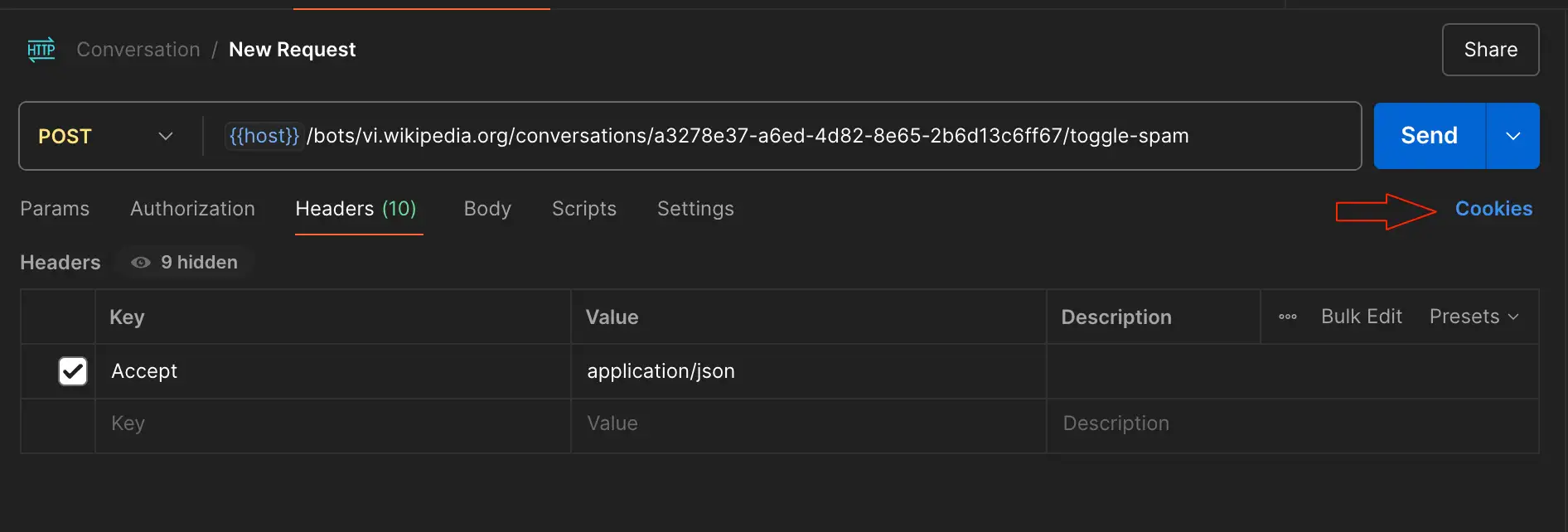
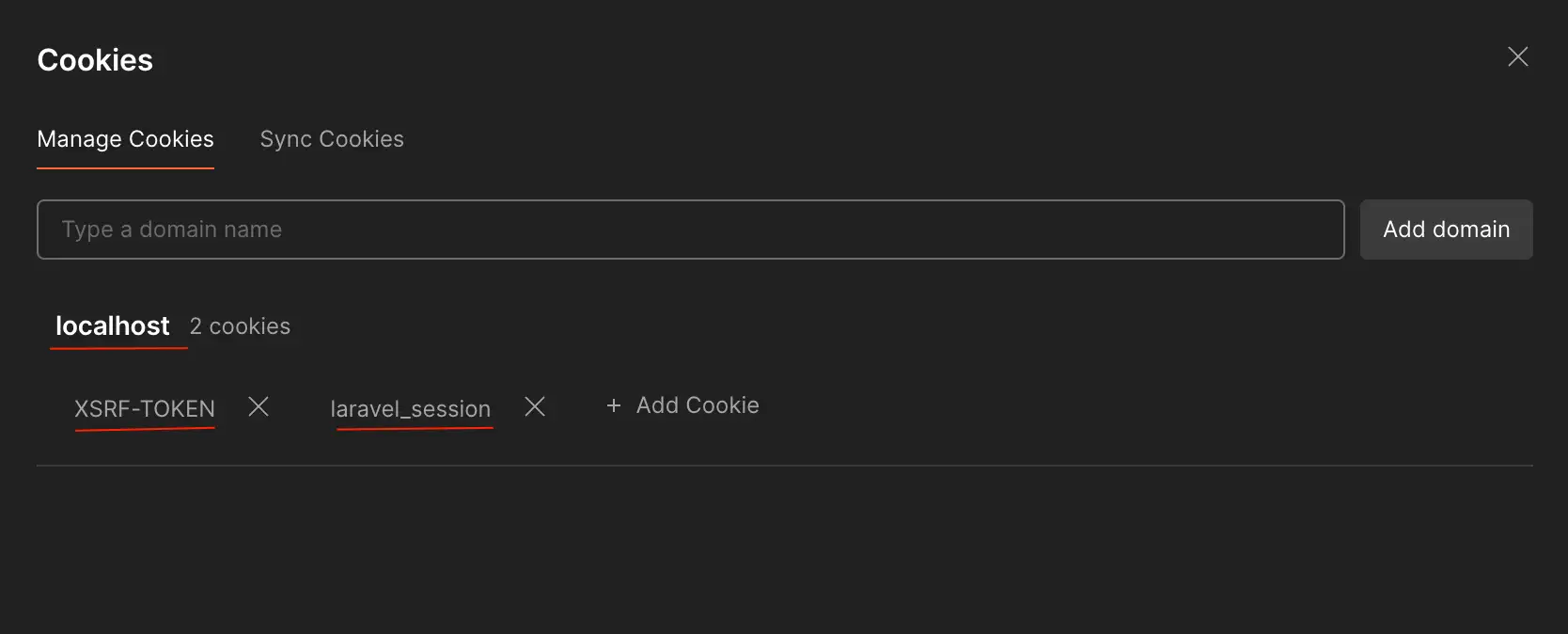
By including these cookies in my Postman request, I was able to bypass authentication and successfully call the API.
Conclusion
When working with Laravel 11 and Postman, dealing with CSRF protection and authentication can be challenging. However, by explicitly allowing certain routes to bypass CSRF validation and using browser session cookies in Postman, you can efficiently test your APIs without unnecessary roadblocks.
If you have faced similar issues or have alternative solutions, feel free to share them in the comments!